
Mission 37: The Shared Tree — Collaborating Without Wrecking Anyone’s Work (Including Your Own)
You log into FamilySearch one Tuesday morning, click on your great-grandfather’s profile, and something is different. A name has changed. A date has shifted. A source you carefully attached last month is simply gone.
Nobody broke into your account. Nobody vandalized your tree. And yet your ancestor looks different than he did yesterday.
Here’s what probably happened. Somewhere in the world, another researcher opened the same profile you just opened. They didn’t know you were working on it, and they didn’t see your careful sourcing — or maybe they did, and thought their version was better. They made a change that felt right to them, and it erased something you’d done. To them it felt private and local, because every genealogist is used to working alone in their own tree.
But on FamilySearch there is no “your tree.” There is one tree. Billions of people. Millions of researchers editing it at the same time.
That’s a hard truth for beginners, and it’s also the best reason to learn what comes next — not how to protect yourself from strangers, because you can’t, but how to collaborate so carefully that when two researchers’ work lands on the same ancestor, you both end up better off instead of worse.
One Tree, and It Isn’t Yours
FamilySearch Family Tree is architecturally unlike any other genealogy database most beginners have used. Ancestry, MyHeritage, even RootsMagic running on your own laptop — those are private trees. You build them, you control them, and if you attach the wrong record by mistake you delete it and nobody else is affected.
FamilySearch works the other way around. It’s a single shared tree: one public profile for every historical person, worldwide, and every researcher contributes to that same profile. You don’t have your tree and your cousin doesn’t have hers. You both work on the same ancestor’s profile. That’s a radical design choice, and it explains why shared-tree etiquette matters here in a way it never did on a private platform. An edit you make isn’t local anymore. It propagates outward. A mistake you make becomes somebody else’s problem.
It also means the reverse. Two third cousins who have never met can strengthen the same profile with entirely different evidence. A beginner can walk into a branch someone else already researched carefully and inherit years of work in an afternoon.
So how does FamilySearch notice when two people are working the same ancestor from opposite directions? A background process constantly scans for duplicate profiles. When it finds two that might be the same person — matching names, overlapping dates, shared family members — it flags one of them with a red exclamation mark and the words “Possible Duplicate.” That flag isn’t an instruction. It’s the system saying: we think you should look at this.
The Merge, and the Three Ways Out of It
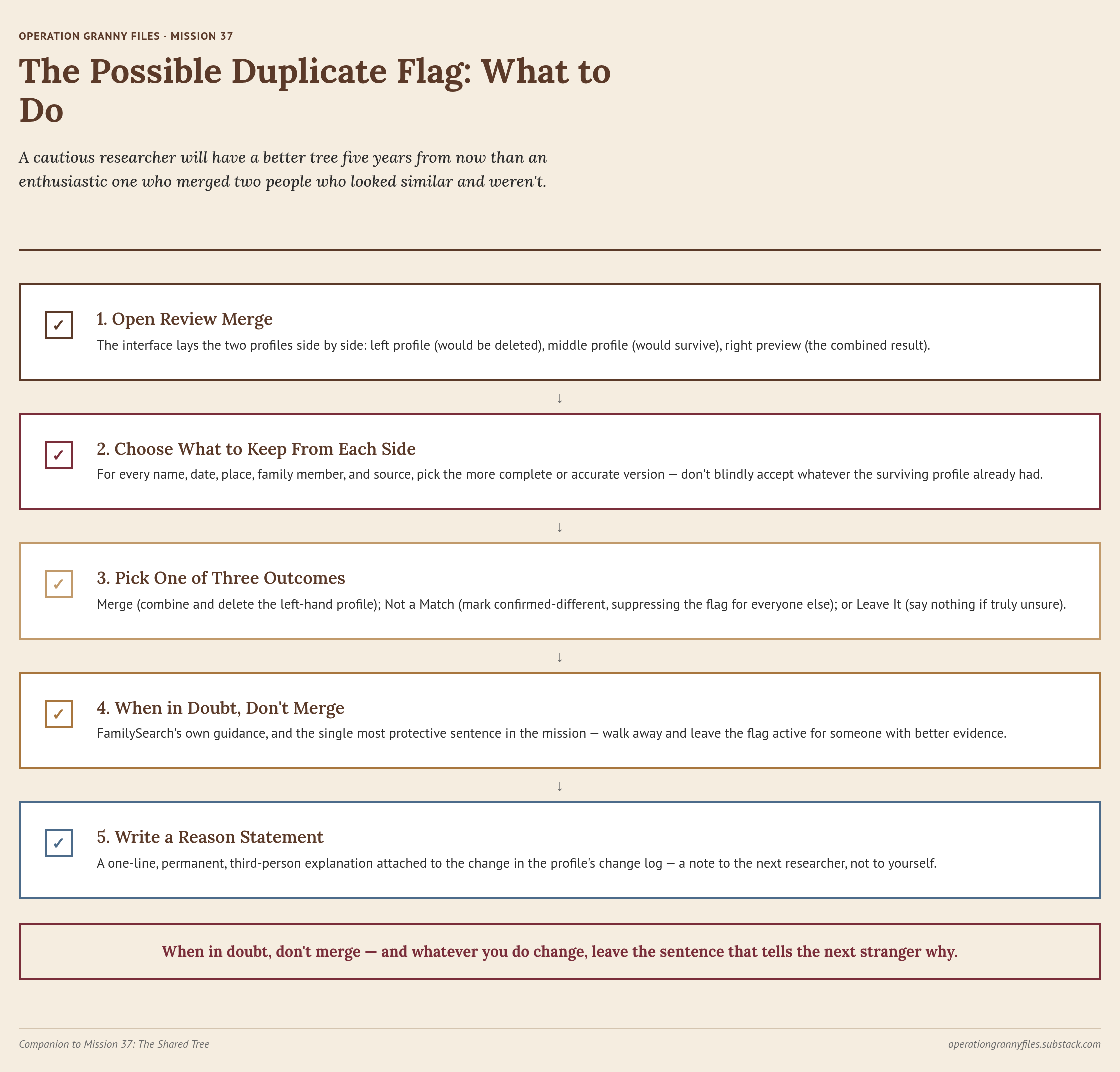
The Possible Duplicate flag opens a door called Review Merge. Click it and the interface lays the two profiles out side by side: on the left, the profile that will be deleted if the merge goes through; in the middle, the profile that will survive, usually the one you started from; on the right, a preview of what the combined profile is going to look like.
Here’s the part beginners miss. You choose what to keep from each side. For every piece of information — names, dates, places, family members, sources — the interface lets you pick the more complete or accurate version rather than blindly accepting whatever the surviving profile already had.
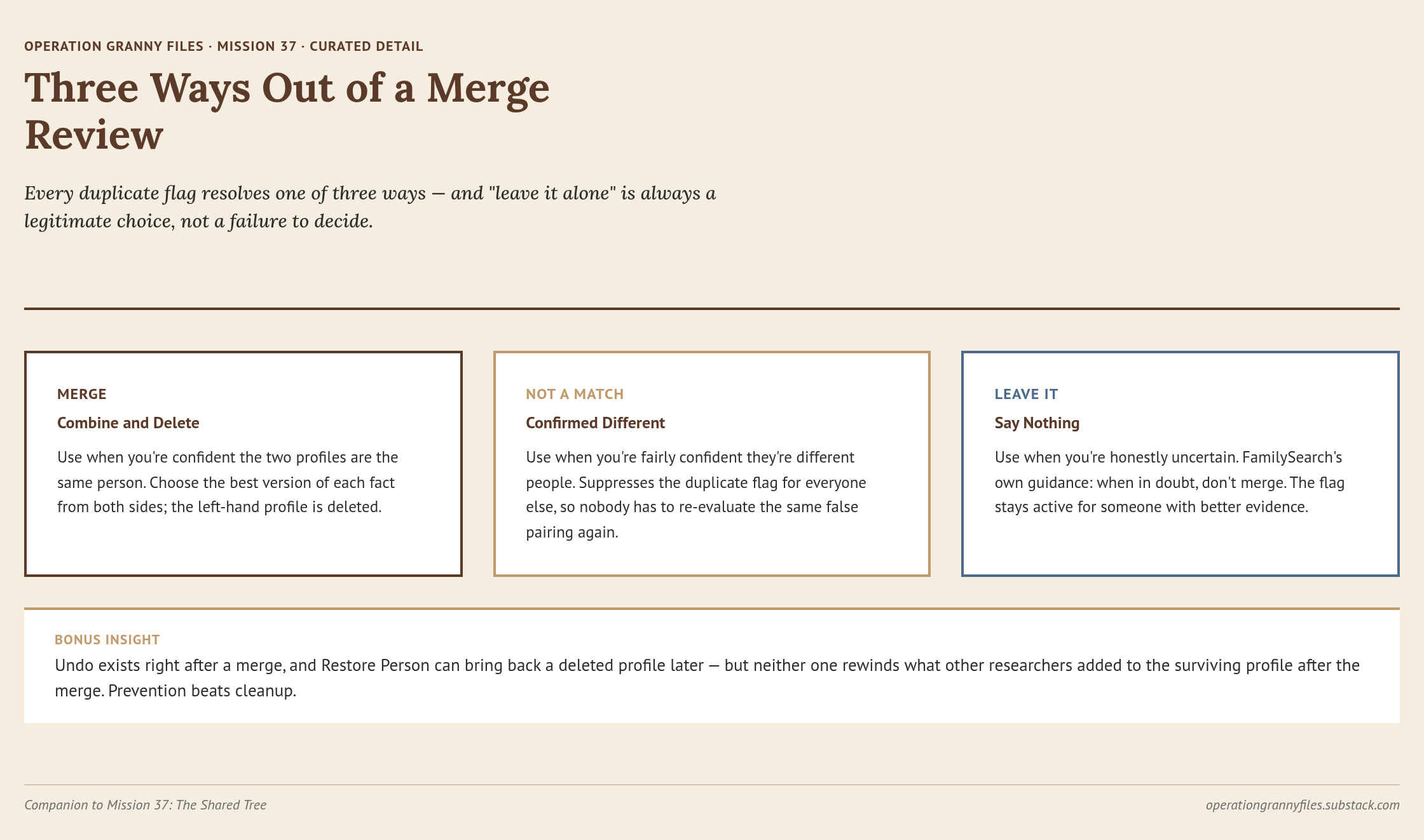
From there you have exactly three ways out:
- Merge. Combine them, delete the left-hand profile, done.
- Not a Match. Mark them as confirmed-different people. This suppresses the duplicate flag for everyone else, so nobody has to re-evaluate the same false pairing again.
- Leave it. If you’re truly unsure, say nothing. FamilySearch’s own guidance is blunt about this: when in doubt, don’t merge. Mark it Not a Match if you’re fairly confident they’re different people. If you’re honestly uncertain, walk away and leave the flag active for someone with better evidence.
That third option is the most protective sentence in this entire mission. When in doubt, don’t merge. A cautious researcher will have a better story five years from now than an enthusiastic one who merged two people who looked similar and weren’t.
The Undo Safety Net — and Exactly Where It Ends
Nothing calms beginner anxiety faster than knowing there’s a way back. There is one — but its limits are sharper than people expect.
Immediately after a merge, an Undo option appears on screen. One click, merge reversed, profile restored. If that window has closed but nothing else has been changed on the surviving profile since, you can still undo through the profile’s Latest Changes log: find the merge entry, click Merge Analysis, then click Undo Merge in the top right. The system will ask you to write a short reason statement explaining why the merge was wrong. FamilySearch’s own example is a good model — “Joan Sampson (ABCD-123) was born in Lincolnshire, England, in 1852. Her parents were John and Mary Sampson. Joan Sampson (ZYXW-789) was born in Yorkshire, England, in 1858. Her parents were James and Ann Simpson. They are not the same person.”
But here’s the trap. If changes have been made to the surviving profile since the merge, the Undo Merge button will be grayed out.
That’s where Restore Person comes in. From the Latest Changes log, click the name of the person who was deleted in the merge. Open their profile summary, which will show as deleted. Click the black bar at the top that says Restore Person, and the deleted profile comes back.
But — and this is the part worth reading twice — Restore Person brings back the deleted profile as it stood at the moment of the merge. It doesn’t touch the surviving profile. Anything added to the survivor since the merge stays right where it is. So if someone merged two people badly and a third researcher then attached a census record to the survivor, restoring the deleted profile brings that person back but leaves the census record sitting where it doesn’t belong. You’ve fixed the bad merge. You haven’t rewound what happened after it. The rest is hand work.
How to Spot a Merge Gone Wrong
FamilySearch documents concrete warning signs that a merge has created problems, and they show up in ancestor profiles far more often than they should. Learn to recognize them:
- A person shows multiple spouses with no evidence of death or divorce between them.
- An implausible number of children — twenty or more.
- Children born before the mother could have children, or more than nine months after the father’s death.
- Children’s birthplaces that contradict the family’s documented residence history.
- Siblings born less than seven months apart, or with improbably large age gaps.
- A child sharing a name with an older sibling who was still alive at the time.
- Life events out of order: christened before birth, married at age two.
- Conflicting sources on the same profile — two census years placing the person in different states.
Dates deserve their own rule of thumb. Two birth dates within five or six years of each other might still plausibly belong to the same person; record-keeping simply wasn’t that precise. An eighteen-year gap is a strong signal you’re looking at two different people who share a name. If you see “John Smith” born in 1845 and “John Smith” born in 1863, in the same county, flagged as possible duplicates — they’re probably not the same man.
And here’s why any single bad merge matters more than it looks like it should: wrong merges compound. An incorrect merge creates internal inconsistencies that look, to the system, like more possible duplicates, which invites more bad merges on that profile and on the family attached to it. The mess spreads outward along the branches. That’s why prevention is worth so much more than cleanup.
Sources Over Assertions
When a new FamilySearch user spots a wrong name or date on a shared profile, the instinct is to retype it and move on. You do that in Word. You do it in Google Docs. Why not here?
Because here, the next researcher who opens that profile has no way to know why the change was made, whether it rested on a source, or whether it should be trusted at all. On a shared tree, that silent uncertainty is what erodes collaboration. FamilySearch anticipates it with a small but powerful feature: at almost every point where you edit a fact, attach a source, or complete a merge, the interface prompts you for a short reason statement.
A reason statement is a one-line, permanent explanation attached to that specific change in the profile’s change log. It is not a note to yourself. It is a note to everyone who comes after you.
It serves both audiences at once. The act of explaining a change is a check on your own sloppy editing — if you can’t articulate why a change is correct, you probably shouldn’t be making it yet. And for the next researcher, a clear reason statement is the strongest deterrent there is to someone undoing your work by accident, because it tells them exactly what evidence justified it.
FamilySearch’s own guidance gives us the recipe:
- Write in complete sentences, third person, not “I” statements: “The 1880 census shows…” rather than “I found that…”
- Keep it under 2,000 characters, and keep the tone professional and neutral.
- Say specifically what the source supports and what still needs sourcing: “Birth year from 1880 census; vital record confirmation still needed.”
- Identify and attach the actual source, tagged to the specific fact it supports.
- If sources conflict, state which one you’re trusting and why.
- If a family story contradicts the documented record, explain why you prefer the record.
- If a fact is estimated or derived rather than directly found, say so and show the reasoning.
- If you’re deleting information outright, explain why deletion rather than correction was the right call.
Granny’s confession: I got this wrong for years. I’d edit a profile, attach a source, and skip straight past the reason-statement box because I told myself I was busy. What I was actually doing was leaving ambiguity on a shared tree for a stranger to untangle. The first time someone undid my work — not out of malice, but out of perfectly reasonable uncertainty about whether I’d sourced it at all — I finally understood what two sentences, written at the moment I knew my own reasoning best, were worth.
Notice, too, that the two halves of this mission aren’t separate problems. They’re cause and effect. A tree with good reason statements accumulates far fewer of the ambiguous, source-conflicted profiles that generate false duplicate flags and tempt careless merges. And when a bad merge does happen, it’s far easier to diagnose and reverse if the original researcher left a clear trail.
Think of a reason statement as a proof argument in miniature. You’re not writing ten pages — you’re applying the same discipline: here’s what the evidence says, here’s why I trusted it, here’s what still needs work. That’s Genealogical Proof Standard thinking applied at the point of edit rather than saved for a separate writing exercise later.
The Etiquette That Holds the System Together
Beyond the mechanics, the collaboration habits worth living by come down to four.
Communicate before making structural changes when there’s reasonable doubt. FamilySearch puts a Discussions feature on the Collaborate tab precisely so you can post “I think these two are actually different people — does anyone have sourcing before I unmerge?” instead of acting unilaterally. Discussions are threaded conversations for open questions; a reason statement is a one-way note explaining a change already made. Different tools, different jobs. Get comfortable with both.
Assume good faith by default. The overwhelming majority of bad edits on a shared tree are honest mistakes made by someone trying to help. Never write a reason statement as an accusation. And if you believe another researcher got something wrong, check the change log, read whatever reason statement went with it, and consider reaching out — click the contributor ID beside the change, then Message, and you can write directly to the person who made it. They are almost certainly as attached to that ancestor as you are.
Attach sources before making structural changes. An unsourced correction is exactly as vulnerable to the next well-meaning stranger as the version it replaced. Sources are what earn collaboration.
Remember what tree you’re standing in. On FamilySearch there’s no “just my tree” to retreat into. Every improvement benefits every other descendant. So does every mistake.
Every Edit Is a Note to a Stranger
Shared-tree genealogy isn’t for everyone. Some researchers will always prefer a private tree, and that’s a legitimate choice. But if you’ve built a profile on FamilySearch — and if you’ve followed this series at all, you have — you’re part of a global research project now, whether you signed up for one or not. You’re sharing an ancestor with strangers. Some of them will be careless. Some will be brilliant and hand you something you’d never have found alone. Most land somewhere in between.
The researchers who leave clear reason statements, who merge carefully, who assume good faith, and who reach out to ask rather than to accuse — those researchers have the best trees. Not because they’re smarter, but because they’ve built habits that let other people’s good work flow into theirs instead of colliding with it. That’s the difference between genealogy as a solitary hobby and genealogy as a conversation carried across decades and oceans.
You’re ready to be that researcher. You know how to merge without destroying, and how to correct without erasing someone else’s reasoning. And you know that on a shared tree, every edit is a note to a stranger. Write it like they’re listening. They are.
GRANNY SAYS: When in doubt, don’t merge — and whatever you do change, leave the sentence that tells the next stranger why.
Raising Researchers Who Can Share the Tree
There’s a lesson buried in this mission that has almost nothing to do with genealogy: your work lives in a place other people can reach, and how you explain yourself determines whether it survives. That’s a hard idea to teach a ten-year-old in the abstract and a remarkably easy one to teach with a real ancestor’s profile on the screen. The Operation Granny Files Homeschool Workbook turns shared-tree collaboration into something a young researcher can practice — writing their own reason statements in plain language, weighing whether two look-alike records really are the same person, and deciding when the honest answer is “I don’t know yet.” Let them make that call themselves. A kid who learns to say not enough evidence about their own great-great-grandfather has learned something that will outlast the family tree.
Mission Downloads
Catch Up on the Series Browse every lesson in the Operation Granny Files mission archive.