
Mission 32: The Machine Reads the Handwriting — Full-Text Search, AI Transcription, and What Just Became Possible
Storyteller — The Book That Reads Itself
Do you remember when I told you to read every page of a parish register? Line by line, slowly, because if you skimmed you’d miss a name buried in the margin or squeezed between two other entries. I was right about that then. But I’m about to tell you something that even I’m still getting used to:
The machine can do it now. And it does it faster than we can blink.
A few years ago — no, a few months ago — if you wanted to search a handwritten record for a name the human cataloger hadn’t typed into a database, you had two choices: come back later (maybe), or read the whole thing yourself. We got good at reading. We learned abbreviations. We learned that long s looks like f. We brought magnifying glasses and lamps. And we became, out of necessity, the kind of people who could read 1820s pharmacy ledgers without breaking a sweat.
That constraint is now partially gone.
The breakthrough isn’t magic — it’s honestly something better. It’s a tool you can learn to trust. It just takes the same rigor you already own.
Why This Matters More Than It Looks Like It Does
If you skim past this mission thinking “sounds like a tech update, I’ll catch it later,” here’s what you’d be skipping: every record set you’ve already searched — census, land, probate, church — and come up empty on is now searchable a second way. Not a new record type. A new way into the old ones. Names that were never typed into an index because no cataloger had time to type every witness, every margin note, every heir, are newly findable. This mission isn’t optional background on a shiny tool; it’s a second pass over every brick wall you’ve already hit.
Teacher — Search, Locate, Read, Cite
What Full-Text Search Actually Is (And What Changed)
For the whole history of genealogy, we’ve searched the way a librarian sorts a card catalog. You write down a name. The index — the one a human typed, decades ago — tells you whether that name appears in a certain book or collection, and if you’re lucky, on which page.
That index saved us. But it was also a gatekeeper. If a name appeared on a page but not in the fields the cataloger chose to type? Functionally invisible. Invisibly absent.
Here’s what changed: Modern machines can now read the whole page.
It’s called handwritten text recognition, or HTR. It’s not the same as older optical character recognition — OCR can manage printed text pretty well, but it struggles with handwriting the way you or I would if we tried to read someone else’s doctor’s notepad at a glance. HTR is different. It’s trained on thousands of examples of actual historical handwriting, and it learns to interpret the variable, inconsistent, cramped shapes humans made when they were writing by candlelight on an October evening in 1847 with a quill pen that wasn’t quite sharp enough.
The result, in plain terms: full-text search now means you can search for a word or a name anywhere on the page, not just in the fields somebody decided mattered.
Your ancestor appears in a will as a witness, in a margin note, in a list of heirs that the cataloger never bothered to type into the index? Full-text search can find them. They’re misspelled so badly the original cataloger didn’t recognize them as a name at all? The machine is less picky about spelling variation than a human’s typewritten index ever was.
This is not metaphorically useful. This is materially, measurably useful.
Where This Lives Right Now
Let me name the actual tools, because real names matter more than abstract capability.
FamilySearch’s Full-Text Search is the most important one for a beginner, because it’s free and it covers nearly two billion record images. You find it through FamilySearch’s help center, right there in the search box you already know. As of 2026, it covers English, Spanish, and Portuguese with expansions announced for Chinese, French, German, Dutch, and Italian — which matters directly if you’re chasing an ancestor who wrote in Paris or Stockholm or Mexico City. It searches land records, court records, Mexican notarial records, the kind of files that historically had no name index at all, and it gives you back the page, the collection, and the specific location on the page where the match appears.
Ancestry has shipped two related but distinct tools. There’s an Image Transcript feature — you can upload your own document (a family letter, a Bible page, a deed) and get a machine transcription back instantly. And separately, Ancestry applied handwriting recognition to its own record collections, most famously to 2.4 million pages of Revolutionary War pension files that had been, until recently, browse-only — readable only if you had a month to sit in front of a screen flipping pages. Now you can search for your ancestor’s name anywhere in that entire pension file, as a witness, as a dependent, as a marginal note, anywhere.
MyHeritage launched something called Scribe AI in March 2026. It transcribes and interprets historical documents. And — fair warning — it’s newer, and newer tools change fast. Keep your expectations realistic and your eye on the version number.
There are others. Transkribus is powerful if you want to upload your own document and get serious handwriting recognition. National Archives projects are beginning to use this for sensitivity review and transcription. But for a beginning genealogist sitting at home, FamilySearch and Ancestry are where the volume lives, where the free tier begins, and where it makes sense to start.
A Worked Example: The Name That Was Never Indexed
Imagine you’re researching a Thomas Reed in early 1800s Massachusetts. He owned property. You’ve exhausted every spelling variant of “Reed” and “Read” in the deed indexes — nothing. Your assumption: no deeds exist under his name in this county.
Then you run a full-text search, because why not, you have five minutes.
You get a hit. The machine found his name on a deed from 1814. Not as the seller or the buyer — he’s a witness. That field was never typed into an index. Nobody cataloging that collection in the 1980s took the time to type “witnessed by Thomas Reed.” The cataloger typed the parties to the sale. The witness? Invisible.
You click through. You open the image. You read the handwriting. You confirm: yes, there’s Thomas Reed’s name, right at the bottom of the deed, in what looks like his own hand, alongside two other witnesses. The deed itself is dated, witnessed, recorded. You have a location where Thomas was at a specific moment, which — when you cross-reference it with your other Thomas Reeds and rule out the ones who were in Pennsylvania that year — helps you confirm which Thomas is yours.
You write in your research log: Deed, 1814, Thomas Reed (witness), Essex County Deed Register, [whatever collection the image came from], page [number], accessed via FamilySearch Full-Text Search, [date accessed].
That’s the win. Not “the AI found it.” The win is that full-text search made a previously unsearchable mention of a name searchable for the first time, and your own reading and judgment confirmed it was worth keeping.
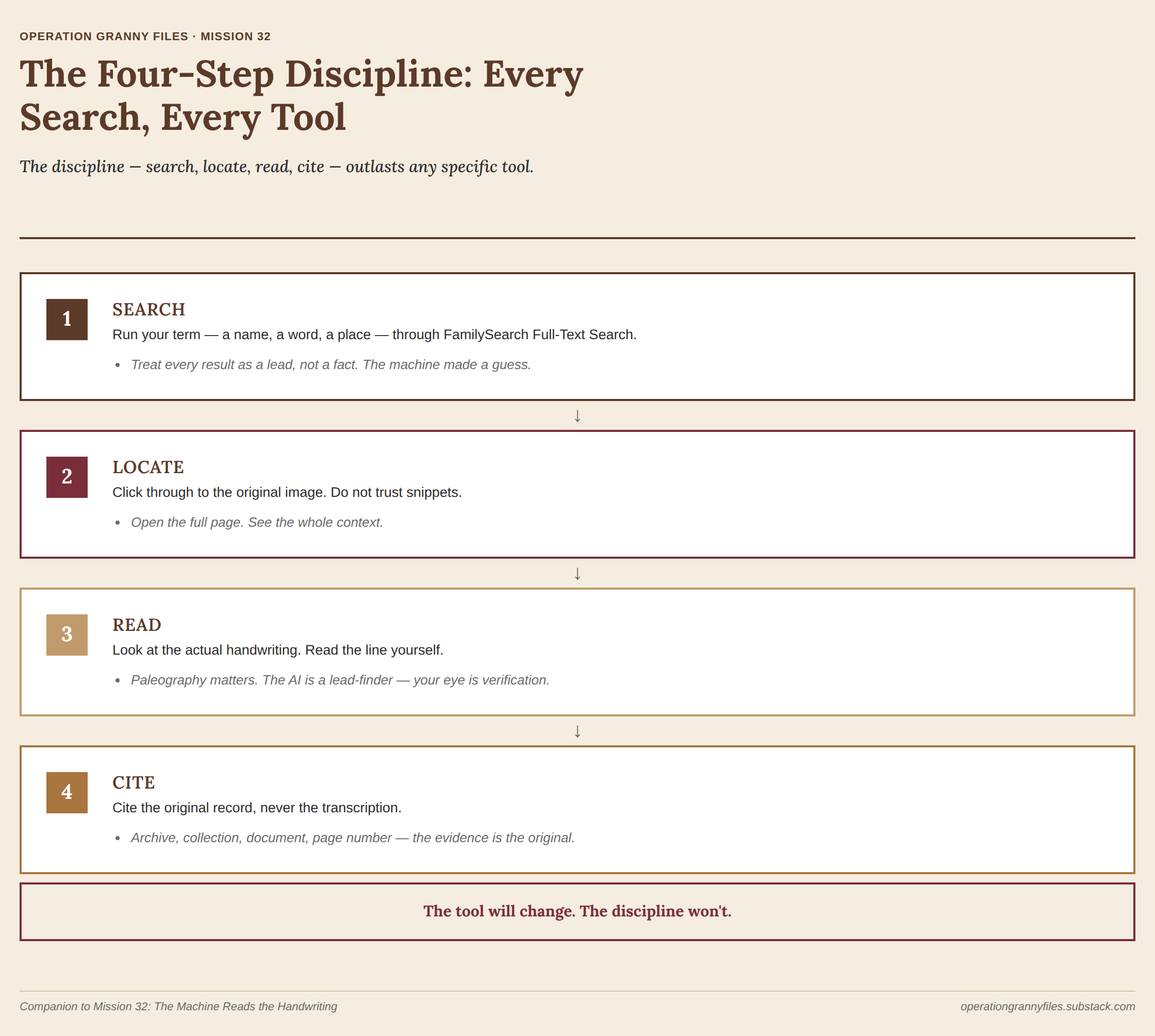
The Four-Step Discipline: Search, Locate, Read, Cite
Here’s the part that matters most, because every tool will change and evolve, but this discipline won’t:
- Search. Run your term — a name, a word, a place — through the platform’s full-text search. Treat every result as a lead, not a fact. The machine made a guess at what the handwriting says. The guess is often right. Sometimes it’s confidently, specifically wrong.
- Locate. Click through to the original image. This is not negotiable. A search result that shows you a snippet of text — a few words of context around your name — is not the same as opening the full page and seeing it yourself. Snippets lie. Or more precisely, they’re true but incomplete. Open the image. See the whole page.
- Read. Look at the actual handwriting. Read the line yourself, using whatever paleography skill you have — if you worked through Mission 29 on colonial research, you know what long s looks like; you know that abbreviations litter the text. If you don’t know paleography yet, now is an excellent time to get acquainted with it. The AI’s transcription is a lead-generation tool. Your eye is the verification tool.
- Cite. Write your citation to the original record — the archive, the collection, the specific document and page number. Never to “AI transcription.” Never to “the search platform’s transcribed text layer.” This directly ties back to Mission 19, on the Genealogical Proof Standard. An AI transcription is a derivative source — a finding aid, useful for pointing you toward something, never itself the evidence. You cite the evidence, which is the original document you read with your own eyes.
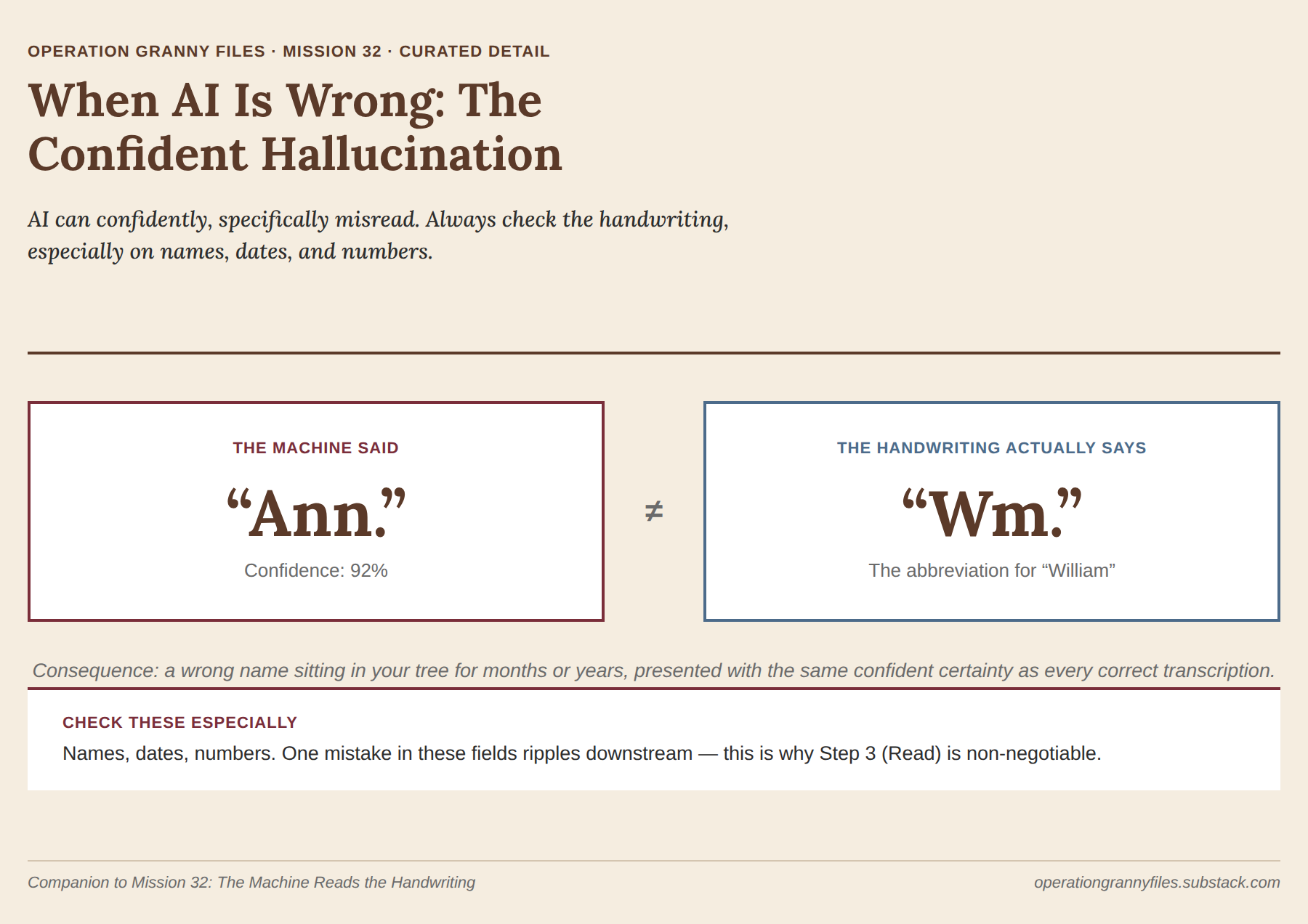
Granny’s confession: I need to tell you something uncomfortable — AI transcription systems are confident even when they are wrong. There’s a documented case where a machine reading nineteenth-century handwriting saw the abbreviation “Wm.” (William) and transcribed it as “Ann.” Not a typo. Not uncertainty. A specific, plausible-sounding name that happened to be completely wrong, presented with the certainty of a modern typewriter. A different system, given a smudge or a torn part of a page, doesn’t flag the uncertainty — it fills in a plausible guess based on the context around it. I’ve been fooled by a confident wrong answer before, and I’ll be fooled again if I skip Step Three. Assume it can happen on any line, and check the actual handwriting, especially on names, dates, and numbers, where a mistake ripples downstream.
Where Beginners Get Stuck
You’ll trust the snippet and skip the image. The preview text under a search result feels like enough. It isn’t — it’s a fragment stripped of the context that tells you whether the match is real.
You’ll treat a low-confidence match as a dead end. Some platforms show a confidence score or flag a “possible” match. A low score doesn’t mean wrong — it often means unusual handwriting, not a bad guess. Open the image before you dismiss it.
You’ll cite the tool instead of the record. “Found via AI transcription” is not a citation. It tells a future researcher nothing about where the actual document lives. Cite the archive and collection, every time.
You’ll assume newer means more reliable. MyHeritage’s Scribe AI launched in March 2026; it’s promising, but young tools have young failure modes. Treat any brand-new transcription tool with a little more Step Three than a mature one.
Confidant — The Rigor Outlasts the Tool
I once told you that technology changed things about how we search for our people, but the standard for what counts as evidence didn’t change. Mission 19 taught you the Genealogical Proof Standard — reasonably exhaustive research, source citation, resolving conflicts between sources, and knowing how much to claim. A year or two later, I taught you paleography because reading the actual handwriting still matters.
Both of those things are still true, and maybe they’re even more true now.
The machines got smart enough to read what we couldn’t. But that doesn’t mean we get to stop reading. It means we get to read more of what our people left behind — names buried in margins, documents that were previously browse-only, records that were never prioritized for indexing — and the rigor is what lets us trust the machine’s help without letting the machine do the thinking.
This is not a small thing. It’s not magic. It’s better than magic. It’s the moment when a piece of family history that was functionally lost — readable only to the one clerk who wrote it, sitting in a courthouse or a parish office — is suddenly reachable by an ordinary person with a laptop and the patience to read carefully. And the same discipline Granny taught you in the first mission is exactly what makes that reachability trustworthy.
The tool will change. Version numbers will tick up, or the platform you love will be bought by another company, or something better will come along that we can’t imagine yet. But the four-step discipline — search, locate, read, cite — is the piece of this that outlasts the version number.
Hang on to that piece. It’s the one that belongs to you.
GRANNY SAYS: Let the machine find the lead. Let your own eyes confirm it. That order never changes, no matter how good the machine gets.
Teaching the Generations to Use New Tools Carefully
The Operation Granny Files Homeschool Workbook turns source evaluation into a hands-on family-history investigation. Let a young researcher use the machine to find a lead, then practice the part that makes the discovery trustworthy: opening the original image, reading it, and citing it.
Mission Downloads
Catch Up on the Series Browse all missions on the Operation Granny Files Home Page or see the full list in the Archive.